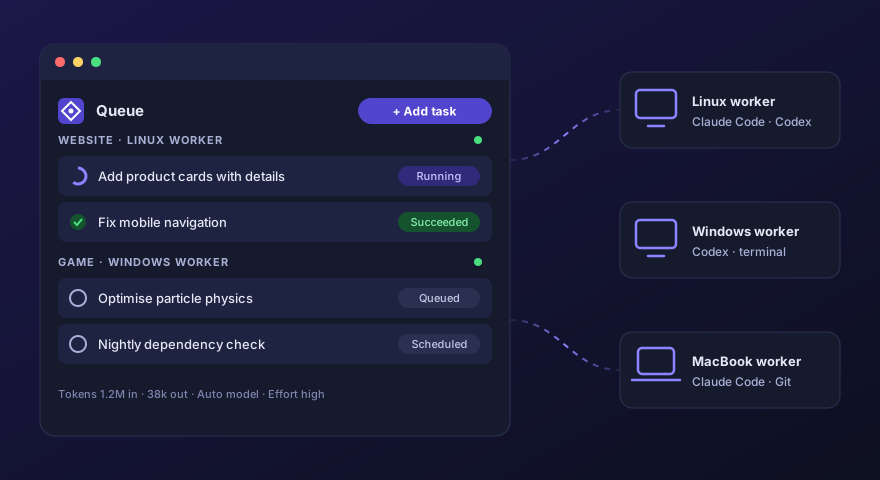
Agent Orchestrator is a control plane for AI coding agents. Describe the work in a browser, on desktop or
phone, and it is queued, dispatched to the right computer and carried out by Claude Code or Codex in the
project’s own repository. Every attempt is committed, logged, measured and reported, so you stay in
charge of many projects across many machines without babysitting a terminal.
How it works
- Install a worker on each Windows, Linux or Mac computer. It connects outbound only, so no ports need to be opened, and updates itself automatically.
- Register projects by browsing to an existing folder, or create a new one from a starter template with Git initialised.
- Queue tasks with instructions, pasted screenshots and
@ references to files in any project.
- Agents do the work on the development branch: the worker runs the CLI, commits, pushes and reports tokens, diffs and screenshots back.
- Review and continue with follow-ups, retries or resumes, then fast-forward master and deploy with one click.
Features
- Smart task queueTasks run in order within a project and in parallel across projects. Organise projects with labels and your own ordering.
- Automatic model selectionEach task is rated for complexity first, then the right model and reasoning effort are chosen. Or pick them yourself.
- Git safety netsSnapshots before every run, automatic rollback of failed attempts and detailed resume reports when a task needs attention.
- Follow-up chainsAgents write a compressed context after each task, so the next task continues exactly where the last one ended.
- Project chatTalk to a project’s agent in the browser. Requests for work become queued tasks, and every reply can be reverted.
- Factory modeGive a project a long-term outcome and a queue of inputs; the agent advances it in small, verified, committed checkpoints.
- Remote workspaceBrowse and edit files, explore Git history and diffs, open interactive terminals and copy files between machines.
- Deploy and moveSave deploy commands per project, and move whole projects between workers with checksum-verified transfers.
- AutomationScheduled tasks with cron expressions and webhook-triggered tasks with signed payloads, for example from GitHub.
- Usage-limit holdsWhen a provider limit is reached, the task waits for the reset time and resumes on its own.
- Usage and cost insightToken usage per project, provider and model, with estimated API-equivalent cost and live counters while tasks run.
- Notifications and JiraPush notifications to desktop and phone, and a built-in Jira Cloud view to triage, edit and create tickets.
Built for trust
- Google sign-in, role-based access, CSRF protection and an audit trail for control actions.
- Workers use revocable credentials and never expose a listening port.
- Project SSH keys are stored encrypted and handed to a single attempt at a time.
- Agents get read-only, time-limited access to other projects for context, never write access.
- Secrets are redacted from logs and reports.
Technology
Agent Orchestrator is used in-house at Gravitonia to build our products, including this website.
It is not publicly available yet.
 Gravitonia